

|
|
Support
CASE STUDY Golf Swing Analysis 
The K-Motion Interactive K-Vest System uses three InterSense InertiaCube Sensor InterSense has teamed with leading golf teaching company.
View Case Study
|
|
Software Downloads
Most InterSense software is available for download from this page. Software is released separately for different families of products, such as IS-900, IS-900 PCTracker, InertiaCubes, IS-1200, etc. Although the software is intended to be backwards compatible with a few exceptions, and many releases contain versions of the same software, releases are tested specifically against the products they are released for and in some cases may not work with other products. If in doubt as to the best software for your product, please contact InterSense Technical Support (techsupport@intersense.com) for assistance in choosing the appropriate software.
Product Families (click to jump to section)
InertiaCube Sensors (IC2, IC2+, IC3, Wireless IC3)
The product CD contains the current software, SDK, and documentation, along with an auto-installer for Windows platforms. You should use this CD with the InertiaCube2, InertiaCube3, and other 3-DOF products. Version 4.04 adds support for the IC2+ product. Please note that customers with wireless IC3 sensors are encouraged to use either the 4.08 (IS-900 PCTracker) or 4.2601 (IS-900) CDs (and corresponding 4.08 or 4.17 DLLs/shared libraries) instead, due to improved wireless stability in those releases.
Size: 109 MB
IS-900 SimTracker/VETracker and VET/VWT/SCT
The product CD contains the latest software, SDK, and documentation for the IS-900 product line, for use with both MiniTrax and MicroTrax devices, as well as documentation. It is recommended that all IS-900 users use this software. It contains an auto-installer. Intended for use with firmware versions 4.2601 and later, but designed to work with all previous versions as well. This version adds support for Mac OS X 10.4 and later.
Size: 81 MB
The product CD contains the current legacy software for the IS-900 product line, for use with both MiniTrax and MicroTrax devices, as well as documentation. It contains an auto-installer. Intended for use with firmware versions up to 4.2302. Most users should use the 4.2601 CD instead, as it is compatible with both MiniTrax and MicroTrax devices and intended for use with all versions of firmware.
Size: 81 MB
The product CD contains legacy software for the IS-900 product line, for use with MiniTrax devices, and documentation. Most users should use the 4.2601 CD instead, as it is compatible with both MiniTrax and MicroTrax devices and intended for use with all versions of firmware.
Size: 92 MB
IS-900 Firmware
The IS-900 contains firmware that may be field-upgraded by customers. While this is generally a safe and fast procedure (often under 1 minute), and it is possible to recover from partial upgrades, InterSense recommends backing up all settings first and performing the procedure during non-critical usage periods in case of any problem. If possible, use of an uninterruptible power supply (UPS) is suggested to avoid any chance of a power failure occuring during the firmware update procedure. Note that while firmware is backward compatible relative to the hardware, the reverse is not true; e.g. if you are on version 4.2008, you may upgrade to 4.2601; but if you are at version 4.2302, you may not be able to downgrade to 4.2008 -- attempting to do so may result in a non-bootable IS-900. While this can usually be recovered from, please avoid this by noting the original version and making sure that you do not change to an earlier version unless you are sure the earlier version was successfully running on your IS-900 at one time.
It is also highly recommended that settings be backed up, the IS-900 restored to factory settings after the upgrade, and the settings re-loaded and saved afterward, to ensure they are properly recognized. To backup or restore settings, use the Tools > Configuration Script tool in ISDEMO to download the settings from the IS-900 and save to a file. The reverse procedure can be used to reload the settings afterward. If any errors occur during the download of settings, ISDEMO will notify you of this; typically this is caused by using excessively long serial cables; setting a lower baud rate or using the InterSense supplied cable or Ethernet may help. Please visually verify that the backup file appears to have been created properly using a text viewer before proceeding.
The firmware versions below are all intended for the SimTracker or VETracker systems (1U form factor). For older IS-900s (VET, VWT, SCT), please contact Technical Support as the upgrade procedure is more complicated. To perform the upgrade, after backing up your settings, unpack the firmware files to a folder and run the ISFileUpdate program. This will allow you to specify an Ethernet or serial port to connect to, as well as Monitor Mode (Ethernet upgrades are only available if the current firmware is 4.2301 or later). Monitor Mode is primarily intended for use when the IS-900 does not boot properly; to put the IS-900 into monitor mode, press the F1 key while the "....." display is scrolling across the LCD during bootup. Monitor mode requires the use of a null modem cable such as the one InterSense supplies with the IS-900; it may also be needed during some upgrades from very old firmware versions to a current version. Contact Technical Support for more information or if you have any problems with the upgrade. All versions listed below require at least version 4.20 to be installed in order to upgrade:
NOTE: ISDEMO version 4.2625 (from 4.2601 IS-900 CD) or later is required to use wireless MicroTrax with this release
Improves large area tracking on SimTracker
Provides serial port passthrough mode (allowing use of RFScope utility to determine optimal channels, and HWDiags for troubleshooting)
Adjustable TCP port/subnet and ISDEMO-configurable Ethernet settings (with ISDEMO from 4.2601 IS-900 Product CD)
Measurement quality values added to LCD and output records (item 76)
Tracking improvements for close-range operation
MiniTrax wireless devices now work with timing adjusters (ATA)
Extended data output available
-
Level 3 self-test implemented
MicroTrax devices supported
Firmware upgrades over Ethernet implemented
Communication integrity output record implemented (item 75)
-
-
IS-900 PCTracker
The product CD contains the current ISDEMO configuration program, SDK, sample code, documentation and demo programs with an auto-installer for Windows platforms. You should use this CD with the PCTracker product.
Size: 88 MB
IS-1200 VisTracker
The product CD contains the current ISDEMO configuration program, SDK, sample code, documentation and demo programs with an auto-installer for Windows platforms. You should use this CD with the VisTracker (IS-1200/InertiaCam) product. This CD is not available for general download, but can be obtained by registering for our support portal or by contacting techsupport@intersense.com. Please note that the IS-1200 requires a program to run called sfServer, which is not compatible with the latest (4.17) SDK without setting an environment variable. If you would like to develop software for the IS-1200 using the current SDK, please contact Technical Support for more information.
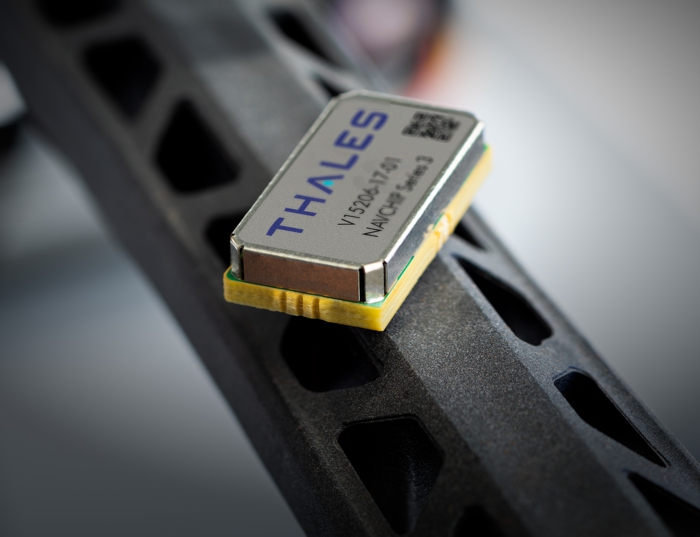
NavChip
All NavChip software is supplied with the NavChip Developer Kit, and is not available for download from the website at this time. Please contact your Sales representative or Technical Support (techsupport@intersense.com) to verify that you have the latest version, or if you have questions about the software.
Development and Troubleshooting Tools
The Hardware Diagnostics application provides diagnostic capabilities for InterSense's 3-DOF and 6-DOF trackers (hardware to connect the tracker to a PC's COM or USB port is required; use with the IS-900 requires firmware 4.2601 or later to use serial port passthrough mode). This program may be helpful in troubleshooting potentially damaged hardware and can provide valuable information to InterSense technical support if hardware failures are suspected. A PDF user's guide, may be downloaded separately from here. Simply uncompress the file and double-click on HWDiags.exe in order to run the application; no installation is required.
Size: 1.1 MB
This is the software development kit (SDK) from the IS-900 Product CD, so it is not necessary to download this separately unless you only require the SDK. It includes libraries and example code for Windows, Linux, and Mac OS X systems. The SDK is primarily intended to support 6-DOF trackers on the IS-900, but also supports 3-DOF trackers and the IS-1200 (additional configuration files required), though it has not been fully tested with those products yet. The example apps from this SDK now behave more similarly between platforms, and the SDK has been reorganized for easier use.
Size: 2.6 MB
This is the software development kit (SDK) from the IS-900 PCTracker Product CD (for the InertiaCube2, InertiaCube3, and Wireless InertiaCube3). It supports all models of InterSense trackers connected to Windows and Linux systems. It includes libraries and example code for Windows, Linux, and Mac OS X systems. This is the same SDK as included on the IS-900 PCTracker Product CD, so it is not necessary to download this separately unless you only require the SDK. The SDK also supports 6-DOF tracking systems except for the IS-1200, but has not specifically been tested with them. Version 4.04 adds support for the IC2+ product.
Size: 2.0 MB
This is the software development kit (SDK) from the 3-DOF Product CD (for the InertiaCube2, InertiaCube3, and Wireless InertiaCube3). It supports all models of InterSense trackers connected to Windows and Linux systems. It contains example code as well as DLLs for Windows and shared libraries for Linux. This is the same SDK as included on the 3-DOF Product CD, so it is not necessary to download this separately unless you only require the SDK. The SDK also supports 6-DOF tracking systems except for the IS-1200, but has not specifically been tested with them. Version 4.04 adds support for the IC2+ product.
Size: 5.6 MB
These are standalone versions of the library, both current and legacy. The library is backwards compatible, so that software written for an earlier version should work properly with a new version. The only significant compatibility issue to be aware of is that the Windows library (DLL) changed the specification for the shared memory interface (used by InterSense Server and sfServer) between versions 3.x and 4.x, so older InterSense Servers (or the currently shipping sfServer from the IS-1200 VisTracker) will not work with newer libraries and will display a warning about an incompatible shared memory interface, and vice versa. The most recent library, 4.17, allows an environment variable (IS_NOSMEM) to be set to skip the shared memory check, and can thus be used to develop software for the VisTracker despite the shared memory incompatibility. Please contact Technical Support for more information or assistance in configuring this, or with any requests for older versions of the library.
Greatly improved detection time (ports are only searched at 115200 baud and if isports.ini is present, only those ports are searched)
Mac OS X support (note that certain USB to serial adapter drivers, including the wireless IC3 receiver, have known problems; initial support is only for wired sensors and the IS-900 via serial or Ethernet)
Environment variable settings allow disabling of log file, skipping shared memory detection, and optional InterTrax II detection
Linux and Mac OS X fixes for wireless IC3 receiver data rate issues
-
-
Size: 0.2 - 0.8 MB
Installing Software
To install ISDEMO or the SDK, unzip the downloaded archive to a directory of your choice. If using pkunzip please use -d option to restore directory structure.
To use the .dll or .so libraries, follow the instructions in the README file included with the SDK.
If have questions about current releases or software installation, please contact Technical Support.
Determining current software or firmware version
To determine the version number of your hardware please use the System Information screen in the Tools menu of the ISDEMO program. Software versions can be determined from the Help > About menus.
When asking for upgrades or technical support, please follow these steps prior to contacting us:
- Launch ISDEMO
- Run the System Self Test under the Tools menu
- In the Tracker Hardware and Configuration Test window, run Tests from the Test menu (if more than one level is available, create a file for each level)
- When the tests are complete, Save to a File from the File menu. This creates a text file.
- Email this saved text file to Technical Support along with your contact information.
|
|